

It’s your friend’s birthday. So, rather than sending them one simple “Happy Birthday” message like everyone else, you message “Happy Birthday” in their DM a hundred times in a row.
Their phone buzzes nonstop for a full minute. It’s the kind of prank that can make friendships more fun.
However, no messaging app in the world has a built-in feature to repeat text. You can type it out manually, but nobody has the patience or thumb strength for that.
So a simple trick that takes just a few minutes to pull off is using a free online tool and the copy-paste function we use every day. In this guide, you’ll learn this exact trick!
Make the Most of Instagram’s DM Limit
Instagram’s DMs were designed for normal conversations, not stunts.
And an important thing you should know about Insta DMs is the character limit. A single message can only be up to 1000 characters (including spaces and emojis). If you paste or type more than that, the message won’t send.
At first, this may sound like bad news to you. But it’s actually the secret to making the trick much more fun.
A giant wall of repeated text in one message can feel like just a glitch. But fifty straight messages one after another, buzzing and popping up on your friend’s phone? That’s a spectacle.
The character limit basically forces the trick into its best version.
How to Send Repeated Text in Your Friend’s Instagram DM (step by step)
Here is the whole process step by step. It’s exactly the same for iPhone and Android.
That’s because everything happens in your browser and the Instagram app that you already have on your phone.
Open a Text Repeater Tool
First of all, open your browser and access any free online text repeater.
Since there are multiple such tools available online, you may choose the one that doesn’t ask for a sign-up or installation.
You can try a few tools and then pick one that best fits your preferences.
A tool with a simple interface, copy/download text option, and a generous number of text repetitions usually works well.
We also chose a tool (for our demonstration) that fits these requirements.
Type Your Text and Select the Repeat Count
After choosing a tool, type/paste the text (in the input field) that you want to repeat. For example, “Happy Birthday 🎂”
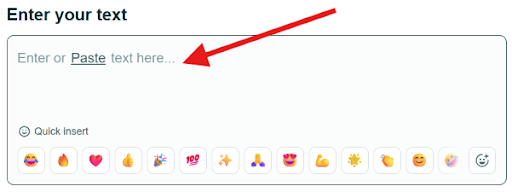
Then choose the number of repetitions you want to generate for your text.
You can select 10x, 50x, 100x, 500x, 1000x, 5000x, or any custom number. The tool we are using for this demonstration allows you to repeat the text up to 20,000 times in one go.
For an Insta DM prank, we suggest somewhere between 50 and 100, so that it stays in the sweet spot.
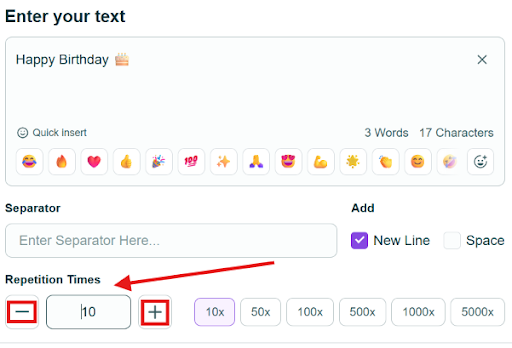
The tool we are using for this demonstration has these two options: “Add New Line” and “Add Space”.
If you go with the first one, each repeat will appear on its own line. With the second one, the repeat is continuous without any line breaks, instead separated by spaces. The first one is much cleaner and funnier.
The tool also includes the “Separator” option. Through this, you can add a character like a comma or hyphen to separate the repeats. However, it’s completely optional.
Generate Repeated Text and Copy/Download the Result
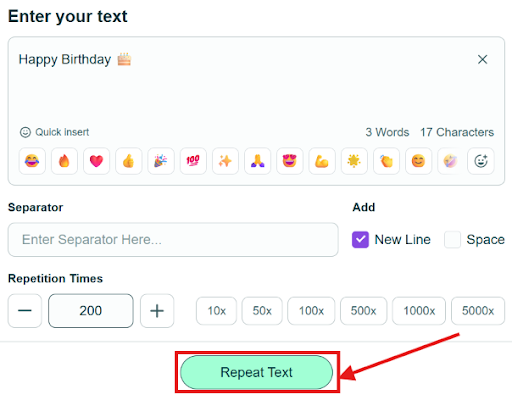
Once you’re all set, click on the “Repeat Text” button at the bottom to generate the repeated text.
The result will appear like this:
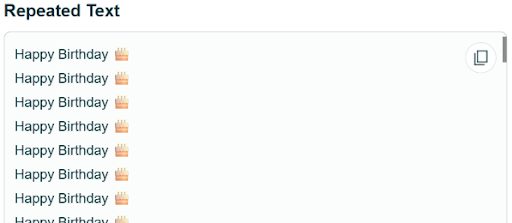
You may copy the repeated text to the clipboard or download it as a Word file.
Copying to the clipboard is usually enough for the DM trick. If you want to reuse the same text block later or make manual edits before sending, then you may download it.
Such tools also support multiple languages, so the trick works for “Bon anniversaire” or “生日快乐” too.
Paste It Into Your Friend’s Instagram DM
Now that you have generated the repeated text, open Instagram and go to your friend’s chat. Paste the text into the message field. Here comes the 1000-character limit back into play. So what to do now?
Do a little rough math before sending. Check how many repetitions fit within Instagram’s current message-length limit. For example, the phrase ‘’Happy Birthday’’ equals 14 characters, so you can send ‘’Happy Birthday’’ 71 times in one message.
Hit send and repeat the paste-send cycle a few times unless you reach the message number you are aiming for.
Then sit back and try to hold your laugh, knowing your friend’s phone is buzzing off the table.
5 Fun (and Harmless) Ways to Use Repeated Text in DMs
Now that you know the trick, you can try it on your friends. Once you have done that, you will start seeing more opportunities to use repeated text in DMs. Here are a few ideas for you to get started:
- Birthday Bomb. Repeat “Happy Birthday” 200 times if it’s your friend’s birthday. Do it at midnight when it flips to their special day.
- Good Luck Spam. Before a friend’s exam, job interview, or big match, send “You’ve got this 💪” fifty times. It’s both a pep talk and a prank in one.
- Inside Joke Flood. That one word/phrase only your friend and you/your group of friends know. Repeat that relentlessly with zero explanations.
- Apology Overload. If something’s messed up, send “I’m sorry” a hundred times. It may not fix anything straightaway. Still, it shows commitment.
- The Countdown. Generate numbers from 100 down to 1. Then send them in chunks. It could be a countdown to a trip, concert, soccer match, or release you’re both waiting for.
Things to Know Before You Spam (Safety & Etiquette)
Before trying this trick, understand that it is meant for fun with friends. Keep it that way and respect a few ground rules.
Instagram watches for spammy patterns. Although it doesn’t have an official daily DM limit, it does limit how people can message each other. If you send a very high volume of exactly the same messages, you may get blocked temporarily. Keep the count reasonable (don’t machine gun 50 messages in 5 seconds), and you’ll be fine.
Prank only those people you think will enjoy it. You should know the difference between a funny prank and an annoying one. If your friend likes this kind of thing, then go wild. If they don’t, it is better not to stress them out.
And never do this with strangers. If you send bulk repeated messages to everyone, your account might get reported/restricted/blocked.
FAQs
Is there a character limit in Instagram DMs?
Yes, there is a character limit of 1000 characters in Instagram DMs. This means that one DM message on Instagram can be less than or equal to 1000 characters (including spaces and emojis), no more than that.
Can Instagram ban me for sending repeated text?
If you send repeated text to your friends in a normal amount, you won’t get banned by Instagram. But a very high volume of identical messages (with spammy patterns) to random users/strangers might trigger bans/blocks.
Does the text repeater work on both iPhone and Android?
Yes, the text repeater works on both iPhone and Android. It can even work on a PC with internet and a browser.
Is the text repeater free?
Most text repeaters, and the one used in this article’s demonstration, are free to use. You can just go to the tool, generate repeated text, and use it.
Summing Up
The trick of sending repeated text in your friend’s Instagram DM is as easy as these four steps. Open an online text repeater. Generate the repeated text. Copy/download it. Send it to your friend in chunks (under 1000 characters).
Use it to make your friends laugh on their birthdays or hype them up before big moments. However, don’t forget to keep it between those who enjoy it.