Social media management tools are more of a necessity than an option. If you’re involved in social media marketing or promotions and looking for time-saving, budget-friendly solutions, then you definitely shouldn’t skip learning about these three trending tools.
Here, we have highlighted three industry-standard leaders and impactful platforms that have been making a strong impact in the field of social media management. These tools are used by teams of various sizes, across different brand levels and business goals.
Let’s see how they differ from each other while still offering universal solutions to manage multiple social media platforms such as Facebook, Instagram, YouTube, LinkedIn and more. These platforms provide cross-platform analytics, social media scheduling, unified engagement, editing and seamless compatibility.
We’ve compared these top three platforms to help you easily choose the one that works best for your needs. Your preferences and comfort matter greatly, so take advantage of this comparison guide to gain maximum benefits in the long run.
Why Do You Need a Social Media Management Tool?
Whether you’re a social media marketer, brand promoter, influencer, creator, agency or a business new to social media marketing, you may need a social media management tool.
We’ve collected survey data and tracked teams and individuals who use social media management tools and also those who don’t. To determine the various factors that suggest whether you need such a tool are not! But one thing is clear: using a social media management platform can make your tasks easier and help you achieve your goals faster and smarter.
Check if you’re facing the same challenges. If yes, then social media automation tool is right for you.
You may need a tool if you are:
- Overwhelmed by the time it takes to juggle between multiple platforms.
- Using several platforms such as Facebook, Instagram, LinkedIn, TikTok, YouTube and more.
- Managing multiple accounts and having to log in repeatedly to publish posts.
- Looking to bulk-schedule posts and automate publishing across channels simultaneously.
- Needing built-in cloud storage to store and share media assets.
- Unsure about post-performance and seeking ways to improve your strategy.
- Missing leads and conversions due to delayed responses to comments or messages.
- Lacking a proper content calendar to plan and schedule posts in advance.
- Finding it difficult to coordinate with outsourced editors or design teams when making edits or tweaks to posts.
A Quick Glance of GUDSHO Social vs. Hootsuite vs. Sprout Social
Why take a long product tour? View everything at once in one place and see which tool matches your expectations.
This platform comparison of GUDSHO Social vs. Hootsuite vs. Sprout Social helps you make a better decision at a glance. It highlights key features, capabilities and pricing details, helping you determine your budget and whether you can start with a free trial immediately.
Find the right tool quickly and easily, on the go!
| Platform | Best For | Core Focus | Video Capabilities | Cross-Platform | Pricing | Free Trial |
|---|---|---|---|---|---|---|
| GUDSHO Social | Individuals, marketers, brands, agencies & businesses | Bulk scheduling, automated publishing, platform-specific analytics & unified inbox | Beginner and advanced-level video sharing | 5+ social media platforms | Custom plans | 14 days |
| Sprout Social | Small to mid-size teams & marketing businesses | Social media scheduling, advanced analytics, smart inbox & review management | Basic to mid-level video sharing | 4+ social media platforms | Starts at $199 per seat/month | 30 days |
| Hootsuite | Enterprises, agencies & brands | Unlimited post scheduling, team approval workflows, advanced analytics & inbox | Mid-level to advanced social sharing | 5+ social media platforms | Starts at ₹1,915 per user/month | 30 days |
GUDSHO Social vs. Hootsuite vs. Sprout Social: Key Things You Need to Know
Whether you’re comparing GUDSHO Social vs Hootsuite or Sprout Social vs Hootsuite, this section can serve as a guiding light. Here are the key highlights of how each social media management tool helps you manage your social media more efficiently at an affordable cost.
1. GUDSHO Social

Whether you’re new to social media management or have been using other platforms for a while, switching to GUDSHO Social is a great decision. It offers a range of user-friendly and impactful features that make social media sharing a smooth and seamless experience.
Enjoy hassle-free social media integrations with popular platforms like Facebook, Instagram, YouTube, LinkedIn and more. GUDSHO Social allows you to automate single and bulk scheduling of posts across multiple channels simultaneously, using an intuitive content calendar, so you need not worry about scheduling posts every day.
Manage all your social media accounts in one place and upload files easily using the built-in cloud storage library. Effectively engage with your audience through a unified social media inbox that lets you connect and respond to messages from every channel in one single chat box.
From minor tweaks to major, studio-like editing, GUDSHO Social lets you do it all without switching tabs or applications. No downloads or installations required, just smooth, professional editing right at your fingertips. You can record, repurpose content and edit raw footage of any size to create social-media-ready content in just minutes.
Above all, the platform simplifies your entire social media management process with platform-specific analytics that combine performance reports from every channel in one place. This gives you a holistic view of what’s really happening across your accounts, without jumping between platforms and missing important details.
GUDSHO Social automates, supports and analyzes your every social media move without eating away your time or budget. If you’re looking for a simple, easy-to-use platform that frees you from repetitive tasks, go ahead and choose GUDSHO Social. It’s a decision that you won’t regret.
Features that you would love about GUDSHO Social:
- Auto-publish on 5+ social platforms like Facebook, Instagram, YouTube, LinkedIn and more.
- Supports multiple content formats such as posts, videos, images, PDFs, Shorts, Reels, Stories and more for easy social sharing.
- Create, edit and repurpose social posts and promotional content using the built-in video editor.
- A one-stop content calendar to plan, manage and schedule cross-platform publishing with ease.
- A unified social inbox for seamless communication across all channels in one place.
- A vast media library to upload, host, manage, organize and store videos and images for easy sharing.
- Instant thumbnail maker to create attractive, click-worthy cover images.
- Real-time performance analytics to track impressions, likes, shares, play rates and audience behavior for overall performance analysis.
- Smart alerts to help keep your posts algorithm-friendly across all social platforms, allowing you to instantly make tweaks or adjust content to platform requirements using the editor.
Pros
- GUDSHO offers much more than social media management. You can multistream live webinars, embed videos and personalize your brand’s video player for maximum reach and increased traffic.
- You also get access to multiple admin roles for account access, team approvals and smooth, efficient team management.
Cons
- Not much information is available on pricing plans.
Best For:
- Ideal for brands, creators, influencers, businesses, agencies and marketers.
G2 Rating:
- GUDSHO has a G2 rating of 4.7 /5 ⭐
2. Hootsuite

Hootsuite was the first-ever social media management software with a simplified social sharing process, so you don’t have to rely on a social media team or external resources. It makes content sharing smooth and effortless by automating bulk posts and enabling unified engagement, allowing seamless communication and responses in one place.
Not only that, you can simultaneously maximize visibility across multiple social media platforms, optimize your performance and refine your strategy with real-time social analytics and insights. If you don’t have ready-made content, the platform also facilitates content creation and ideation, helping you generate promotional and marketing-relevant content on the go.
Why log in to every account every day to schedule posts? With Hootsuite’s social media content calendar, you can bulk schedule content in advance with a holistic plan for content distribution. This gives you ample time to plan and roadmap your strategy for impactful social media success, while the platform publishes posts at your preferred time without you needing to be online.
It’s best time to post suggestions is particularly helpful for those unsure about social media posting schedules. Yes, the platform analyzes your audience and recommends the optimal times to post, letting you sit back while Hootsuite handles all the repetitive work behind the scenes.
Key Features of Hootsuite you shouldn’t miss
- Automate publishing social media posts to unlimited accounts with quick integrations across popular platforms.
- Bulk schedule up to 350 social media posts at once using a seamless social content calendar.
- Auto-respond to comments and messages through unified social engagement, ensuring you never miss priority messages or leads.
- Easily set up team approval workflows to finalize social media posts, all in one unified dashboard, without switching tabs.
- Access insightful social media analytics and post-performance reports to optimize your strategy for better results next time.
Pros
- A social listening tool is available to monitor audience responses to your brand promotions.
- An employee advocacy tool is available to help employees share company content for greater social media reach.
Cons
- No video marketing capabilities beyond social media management, such as live streaming or video embedding.
- The platform may appear complex for users who are not familiar with social media management tools.
Best For:
Ideal for mid-level businesses, enterprises, agencies and brands.
G2 Rating:
Hootsuite has a G2 rating of 4.3 /5 ⭐
3. Sprout Social
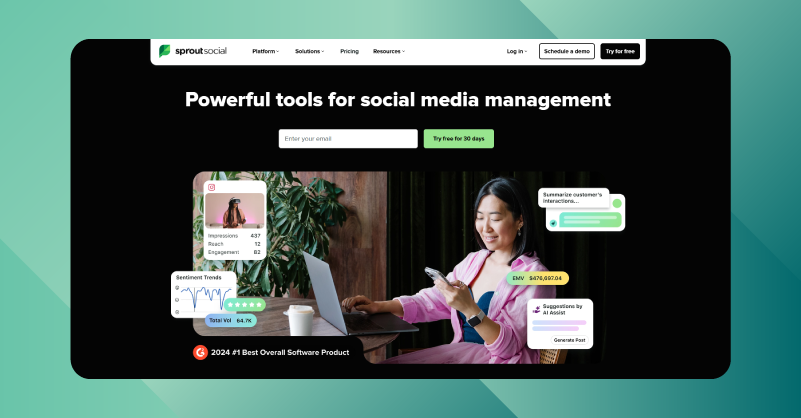
If you’re looking for ways to transform your business and brands through impressive, impactful social media management, you’re in the right place.
Manage multiple social media accounts and boost your team’s productivity by up to 10× with time-saving, cost-effective solutions. Seamlessly plan and schedule multiple social media posts across different profiles or accounts and platforms simultaneously without leaving the tab.
From bulk scheduling social media content to engaging customers through a unified inbox and analyzing performance metrics, you can do it all in one place, whether you’re a small business or a large enterprise.
Accelerate your brand’s growth with smarter content planning and craft the social post that resonates with your audience in simple steps. The optimal posting time suggestions automatically analyze 16 weeks of audience data and behavior to determine the best times to post that attract your specific target audience.
Moreover, Sprout Social helps you stay ahead of your planning by queuing posts in advance and making them easy to share. Team approval features also keep you connected with internal teams, external partners and stakeholders for quick review and approval. If you are considering Sprout Social vs Hootsuite for small businesses, either of them is a go-to choice even for beginners.
Features that make Sprout Social Stand out:
- Get your hands on powerful content creation tools to optimize and instantly prepare social-media-ready content.
- Unified social media inbox to effortlessly manage engagement from all popular social channels in one place.
- Bulk scheduling to draft, queue and automatically publish texts, images and videos across popular social networks.
- Share customized links to embed videos on bio pages, driving more traffic to your social profiles for better conversions.
- Built-in content library to smoothly manage all your digital assets in one organized space.
Pros
- A social listening tool to monitor and analyze mentions of your brand with real-time insights.
- Streamlined workflows that reduce platform complexity, even for beginners.
Cons
- No video repurposing or exclusive editing tools are available.
- No platform-specific smart alerts are available for easy sharing.
G2 Rating
- Sprout Social has a G2 rating of 4.4 /5 ⭐
Feature-by-Feature Comparison of GUDSHO vs Sprout Social vs Hootsuite
You are already familiar with what each platform offers. Here’s a detailed view of how to analyze a platform before getting started, so you don’t have to jump between different platforms to see what they offer and what they don’t.
| Feature | GUDSHO | Sprout Social | Hootsuite |
|---|---|---|---|
| Scheduling | Automated bulk scheduling, universal scheduling calendar & international time zone scheduling | Bulk scheduling, comprehensive social calendar & optimal send times | Bulk scheduling on universal time zones & seamless social content calendar |
| Analytics | Advanced and platform-specific analytics to monitor content performance | Basic analytics to track and monitor content performance & audience reactions | Inbox reporting and analytics tracking for engagement and content performance |
| Video Creation | Built-in video and image editor to create, edit and repurpose content | Social media content creation tool available | Social media content creation tool available |
| Engagement | Unified social inbox | Engagement inbox | Engagement inbox |
| Social Integrations | Integrate with 5+ social media channels | Integrate with 5+ social media channels | Integrate with 5+ social media channels |
| Team Collaboration | Allows multi-admin access | Team approval workflows are available | Team approval workflows are available |
GUDSHO Social vs. Hootsuite vs. Sprout Social: Which Is Best?
This is what most of you have been waiting for: the conclusion. If you haven’t figured it out yet, let me give you a helping hand!
While we’ve highlighted key factors to consider and standout features, some of you may still feel the need to sign in and use the trial period to determine which platform works best for you. And yes, I’m completely on your side.
But a little extra help wouldn’t cost much. Just like outlining the setbacks and the reasons you need a social media management tool, here’s a quick overview to help you decide which option works best for your needs.
Here are the top key points that can fasten your thoughts on social media:
- If you are a budding brand, business, marketer, creator or influencer looking for a handy and user-friendly set of social scheduling tools, GUDSHO Social is a great choice.
- If you’re comparing Sprout Social vs. Hootsuite for basic to intermediate needs with limited video-related features, Hootsuite is a solid option. Sprout Social is also a strong platform, but it lacks a few mandatory features for some users.
- For those evaluating Hootsuite vs. Sprout Social in terms of one-click automated scheduling and faster social media integrations, GUDSHO Social stands out by simplifying the entire social media sharing process with a very clear visual calendar.
- If you’re focused on video promotions and managing videos for social sharing, GUDSHO Social is worth trying. It offers comprehensive video marketing tools, including multistreaming webinars, content repurposing, video editing, video embedding, personalized video players and advanced platform-specific graph-oriented analytics.
Let’s Wrap Up & Choose the One That Makes Social Media Simple!
More than just an insightful approach, this blog should have shown you the things that truly matter in social media management software. So, no more overthinking or delaying, choose the one that makes your social media sharing truly impactful and efficient.
All three tools are equally powerful, but you need to decide on the one that fits your expectations and handles everything smoothly, saving you time and energy for more ideas and moves.
We wish you hassle-free social sharing! 😎
 Srinivasan is a Digital Marketer and Blogger with a passion for video marketing solutions and video hosting platforms. He is committed to sharing the latest tech trends, social media management tools ideas and enjoys discussing new technologies, along with helpful tips and tricks. An avid reader, He loves to share his insights with others.