Managing even a single Instagram account takes stressful effort, so handling multiple accounts can quickly become time consuming.
For agencies managing several client projects, a streamlined social media promotion strategy, along with proper planning and scheduling, is essential. More importantly, social media managers and Instagram influencers should be spending their valuable time sipping coffee and brainstorming creative ideas, not manually pushing teams through repetitive tasks or juggling multiple accounts at a time.
Whether it’s five accounts, a dozen or 30+ Instagram profiles, bulk imports and centralized management make all the difference. But what if you could do all that and more, in one unified workspace?
That’s where top-notch, intuitive Instagram management tools (also known as social media management tools) come in. They help you speed up workflows, maximize promotional efforts and deliver results up to 10× faster.
These tools allow you to unify Instagram messages, manage DMs in a single chatbox, plan content through a centralized calendar, access a built-in media library, edit content instantly and automate publishing, all without switching between platforms.
Let me show you how to do that!
Is it Possible to Have Multiple Instagram Accounts?
Yes, it’s totally possible to manage multiple Instagram accounts. Each account can operate independently, with its own followers, profile name, description, brand image, stories, posts, comments, DMs and settings.
For those managing multiple social media accounts for clients, this setup allows you to separate content, target different audiences and track analytics individually.
So, who needs to manage multiple Instagram accounts?
- Social media marketing managers handling accounts for various products, target audience and sub-regions.
- Social media freelancers managing multiple projects for different clients.
- Social media agencies managing campaigns for multiple businesses and brands.
- Entrepreneurs and solopreneurs using multiple accounts for promotional purposes.
- Enterprises and businesses requiring dedicated accounts for various internal and external purposes.
Instagram itself lets you link multiple accounts through the Account Center. This makes it easy to switch between profiles, notifications and comments. However, there are some drawbacks: you still need to jump between tabs, navigate to each specific profile, and check posts individually to monitor comments and engagement.
You also need to constantly check the DM section for each account to see who messaged you. This can quickly become confusing when managing multiple accounts.
To overcome these challenges, it’s highly recommended to use a social media management platforms. This platform simplifies account management by letting you schedule posts, monitor engagement, unify engagement and manage multiple accounts across platforms from a single dashboard.
Why Managing Multiple Instagram Accounts for Clients Is Challenging?
If you experience any of the struggles mentioned below on a daily basis, it’s time to consider using a social media management tool.
Let’s look at the tasks that are time-consuming and lead to burnout due to tiring manual effort !
- You might accidentally post to the wrong Instagram profile, risking brand credibility and follower’s trust.
- You may struggle to organize and schedule content across multiple content calendars while managing different strategies for each Instagram account.
- Tracking and managing performance reports for every post across multiple accounts can be challenging.
- Juggling comments, DMs and engagement across several Instagram profiles makes it easy to miss important interactions, comments and leads.
- Not having a centralized dashboard to manage everything in one place often leads to confusion, errors and wasted time.
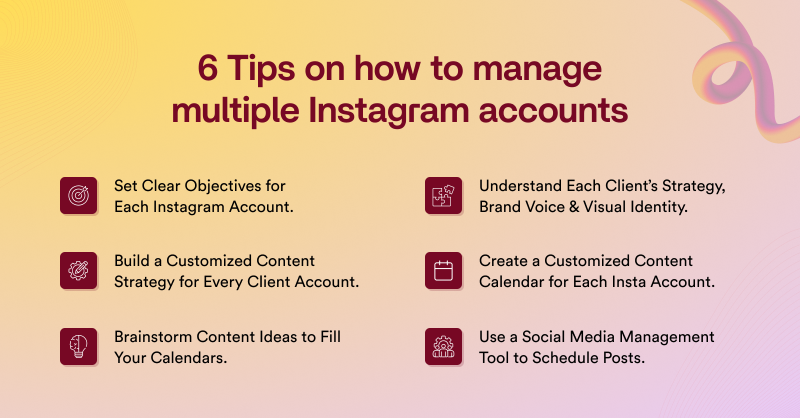
6 Proven Tips to Manage Multiple Instagram Accounts Effectively For Clients
Do you still wonder, How do I manage multiple Instagram accounts at once? Now that we’ve identified the challenges, let’s explore effective strategies using top-notch tips that have worked universally.
Many marketing teams, agencies, brands and businesses have tried these 6 proven tips to manage multiple Instagram accounts successfully.
It’s not rocket science when you do it right, so let’s go through them one by one!
1. Set Clear Objectives for Each Instagram Account
Define clear goals for each Instagram profile to ensure every account serves a meaningful purpose . If you are just getting started with goal management try to apply the SMART framework (Specific, Measurable, Achievable, Relevant, Time-bound) to create structured and trackable social media goals for your posts.
Use market research, market trend analysis and social listening to ensure your Instagram content aligns with audience behavior and needs.
Once the objective is defined and clearly stated, streamline your strategy, improve engagement and manage multiple Instagram accounts more efficiently and effectively.
2. Understand Each Client’s Strategy, Brand Voice & Visual Identity
Before getting started with content creation, it’s essential to analyze and understand each client’s business strategy, brand voice and visual identity. To do this effectively, begin with a clear onboarding session where you gather insights from your clients to understand their objective, target audience and buyer persona better.
Define each client’s brand voice, visual identity and content pillars clearly and document everything in a simple, separate brand guide for each client. Based on this information, create a content strategy that reflects the client’s objectives and resonates with their target audience.
Avoid using the same pattern or approach for all clients when planning content across Instagram accounts. Each client’s Instagram content calendar should be curated to the brand’s unique voice, style, themes and authenticity.
3. Build a Customized Content Strategy for Every Client Account
Plan a well-defined Instagram content strategy based on their goals, audience and niche. A tailored content plan should be created to improve reach and follower growth by aligning with how the audience actually engages. Identify top-performing content formats, best time to post on Instagram and ideal posting frequency for each platform.
Perform content audit, competitor benchmark analysis and social listening to understand what is working and what needs improvement. Using an advanced analytics tools provided by social media management tool helps track performance metrics, audience engagement to optimize better for every next time.
4. Create a Customized Content Calendar for Each Instagram Account
Follow the points below to prepare fully optimized, social media proven steps to use a well planned content calendar effectively on the go.
- Using an all-in-one social media management tool with a built-in comprehensive content calendar helps you integrate 10+ Instagram accounts within one centralized content calendar.
- Use a visual content calendar to schedule posts for multiple Instagram accounts in one place
- Simplify the planning process by organizing content into a consistent posting to maximize visibility and engagement across all accounts.
- Identify performance gaps in the content plan, to improve overall strategy and avoid missed opportunities.
- Utilize tags and labels to track approvals, scheduling and workflow stages for better organization.
- Using an all-in-one social media management tool with a built-in comprehensive content calendar helps you integrate 10+ Instagram accounts within one centralized content calendar.
5. Brainstorm Content Ideas to Fill Your Calendars
When it comes to Instagram and other social media platforms, fresh ideas are key to success. Continuously reevaluate your strategies and innovate your approach to content sharing. Here’s how to get started with new ideas into your content calendar and avoid repetition:
- Align content with your marketing goals and sales pipeline to stay focused.
- Stay true to your brand by emphasizing brand awareness, authenticity and building audience loyalty.
- Curate posts based on your target audience’s preferences and tone of voice for better engagement.
- Keep an eye on current trends and monitor competitors’ posts, social media metrics, optimizing your content accordingly.
- Use analytics to assess content performance and gather insights on what works and what doesn’t.
- Be realistic about your posting capacity; don’t overcommit to unrealistic numbers.
- Repurpose content across accounts in smaller, bite-sized pieces to save time.
- Leverage Instagram collaborations to cross-promote, expand your reach and grow your follower count.
6. Use a Social Media Management Tool to Schedule Posts
This is the most important step you can never ignore. If you want to stay stress-free and effortlessly manage multiple Instagram accounts, you definitely need a social media management tool. These tools simplify the management process, not just for one account, but for multiple platforms. It’s not just for Instagram, but these tools allow you to integrate other social media channels like Facebook, LinkedIn, TikTok, YouTube, X, Snapchat and more simultaneously.
By using a social media management tool, you can manage your clients’ social media promotions in a 360° approach. You can monitor performance, schedule in advance and automate social media publishing across 5 + channels at once.
This means you can sit back and relax without relying on a social media manager or outsourcing agents. With just a few clicks and drag-and-drop functionality, you can get all your work done in minutes!
How to Manage Multiple Instagram Accounts with GudSho Social
This section helps you effortlessly share your Instagram posts across multiple profiles in no time. Also you can streamline Instagram tasks and improve team collaboration, ultimately maximizing your reach.
To simplify seamless Instagram sharing, here’s a useful approach that you should follow:
Using an all-in -one social media management tool like GudSho Social can act as a stepping stone to take your Instagram goals to the next level.
These tools help you create, plan, schedule, edit, organize, analyze and track content from one unified dashboard. You can automate bulk posting, unify engagement with social inbox and work seamlessly with a comprehensive content calendar that allows you to manage 30+ Instagram profiles from a workspace.
If you have bigger teams, GudSho Social supports smooth internal review processes through its effortless collaborative features. You can enable teams to review, draft, comment on and finalize Instagram posts quickly, reducing manual effort.
Its well-organized built-in media library makes it easy to store, access and reuse assets. Meanwhile, the platform’s post previews, thumbnail maker and studio-grade video editing tools ensure that your Instagram posts look perfect before it goes live.
You don’t just save time, but you can automate the entire Instagram management process for a more efficient, productive and less stressful streamlined workspace. If you’re handling several Instagram profiles, using a centralized platform like GudSho Social can significantly improve how smoothly your workflow run!
Turn Managing Multiple Instagram Accounts Into a Breeze!
You no longer need to live the nightmare of handling multiple Instagram accounts manually, just sign up with the best social media management platforms today and stay productive.
Let your social media management take a whole new turn, leading to seamless management and impeccable growth. Wishing you all the best!
 Srinivasan is a Digital Marketer and Blogger with a passion for video marketing solutions and video hosting platforms. He is committed to sharing the latest tech trends, social media management tools ideas and enjoys discussing new technologies, along with helpful tips and tricks. An avid reader, He loves to share his insights with others.