Managing both your personal and business Instagram accounts successfully is no longer just about following a smart scheduling strategy. Today, sharing engaging content, along with planning, preparing and scheduling it in advance at the right times for global audiences, plays a crucial role. This ensures your posting is effective, consistent and stress-free.
So, instead of dealing with a chaotic timeline, rushing to post at the last minute, piling up posts or missing peak engagement windows, adopting automated scheduling helps you stay organized and strategic effectively.
But here’s the catch: not all scheduling approaches deliver the same results. That’s why we tested different scheduling patterns, analyzed 300 accounts and used 10+ Instagram scheduling tools over 30 days to find out what works best for those looking to automate the scheduling process.
In this guide, you’ll discover how scheduling impacts growth and some of the most effective methods to streamline your Instagram workflow, so you can focus less on managing posts and more on creating content that performs.
What is Instagram Post Scheduling?
Instagram post scheduling is the process of planning, organizing and automatically publishing posts, Reels, or Stories at a specific date and time using a social media management tool or an Instagram Scheduler.
Why You Should Schedule Instagram Posts for Better Reach, Engagement & Growth?
The moment you open Instagram, it feels like reels and posts are flooding your feed nonstop. Ever wondered how so many creators manage to show up so consistently with fresh ideas, while millions of users are posting at the same time?
There’s no secret formula. They all schedule and post to Instagram at the best time to post instead of posting manually right on time.
So the best suggestion! Just plan, schedule in advance and stay stress-free.
Here are the top reasons why you should schedule your Instagram posts to manage your workflow efficiently:
1. Save Time to Focus on Productivity
Scheduling posts on Instagram means you don’t have to spend time every day uploading and posting content manually at your preferred times. By doing this, you free up more time to focus on strategy, creativity and growth.
2. Stay Consistent & Stress-Free
Keeping a regular posting schedule helps you stay visible and consistent to your audience. By scheduling posts in advance, you can maintain a steady online presence on busy days and holidays, even when you’re offline. This ensures your audience never misses a chance to engage with you and connect with your brand consistently.
3. Maximize Productivity Through Better Planning
You can schedule content in advance on Instagram using a content planner, allowing you to focus on productivity without worrying about last-minute tasks and deadlines. Stay ahead with your content strategy, keep your monthly goals and targets organized and align everything with your social media marketing objectives.
4. You can Schedule Posts at Prime Time
Your Instagram audience isn’t online 24/7. By scheduling posts, you can reach them at times they are most active, without staying logged in around the clock. You can pre-select the time zone and posting time and schedule your content in advance to go live during peak engagement hours. Doing this, you can maximize reach and increase the chances of connecting with your audience with the right content, without losing their attention.
5. Promote Content & Campaigns Seamlessly
Be it product launches, offer announcements, demos or promotions, you can plan and schedule your entire campaign in advance, without piling up everything to the last minute. This makes sure that you stay consistent in reaching your audience’s feed and engaging with them regularly. It also boosts brand visibility, builds trust and helps grow a strong, engaged community of followers.
How to Schedule Instagram Posts Natively (In-App)
You can schedule posts on Instagram directly through the platform, without any technical learning curve or complicated process. Here are the steps that explain how to schedule Instagram posts.
- Open Instagram
- Navigate to your Profile and click on the + plus icon.
- Now, click on Post or Reel to create the type of content you want to post
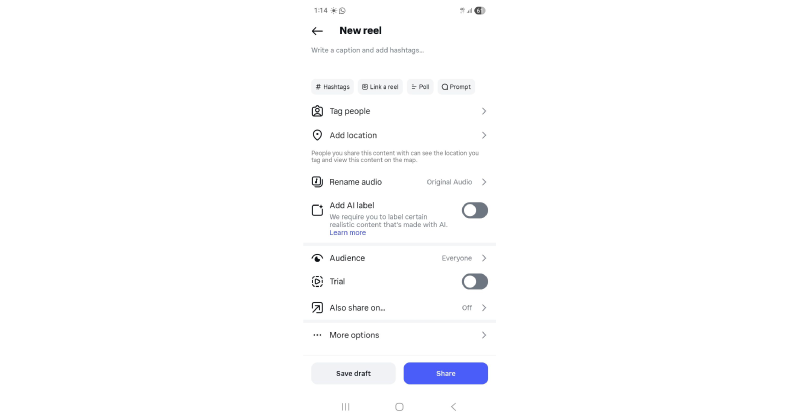
- Make the necessary edits to your content and add a caption.
- Scroll down to the bottom of the page and select Advanced Settings.
- Now, enable the Schedule this post toggle and choose the date and time when you want the content to be posted online.
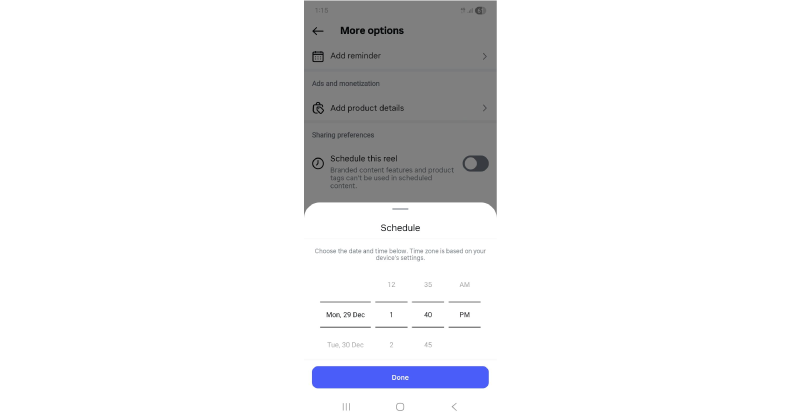
- Now click Done to share your scheduled post.
- If you want to make any tweaks to your scheduled posts, you can do it by opening your Instagram profile and clicking the Menu icon in the top right corner.
- Choose the Scheduled content, then click on the Three dots next to the chosen post or reel to edit.
- Once done, you can reschedule, share now or delete.
Note: Instagram allows you to schedule a maximum of 25 posts per day and a maximum of 75 days in advance.
How to Schedule Instagram Posts Using Facebook (Meta Business Suite)
For those looking to schedule Instagram posts from a desktop rather than a mobile device, Meta Business Suite is a great Instagram scheduler. It also allows you to upload social media posts at the best time on Facebook, as both platforms are integrated within the Meta Business Suite. Whenever you want to schedule and automate Instagram posts, Stories or Reels, you can follow this method.
Here are the steps that make your Instagram posting easy:
- Navigate to your Meta Business Suite account and select Content from the left menu.
- Now click on Create Reel or Create Post.
- If you want to create a Story, click on ? next to the Create Post button and select Create Story.
- Now choose the Instagram account under Post to.
- Now upload your Post, Reel or Story by adding the required texts, images, videos, stickers and more.
- Add Post details, such as catchy text or phrases suitable for your post.
- Preview the post to make any final tweaks or changes.
- Now to schedule and post to Instagram, enable the toggle next to Set date and time.
- Now select your desired date and time and click Schedule.
- Or simply select Finish Later to save it as a draft.
- Your post will be scheduled. Once it’s posted at the scheduled time, you can start engaging with your audience by checking your DMs and tracking performance.
How to Schedule an Instagram Post through GudSho Social?
Let’s see how GudSho Social works as the right Instagram scheduler.
GudSho Social is an advanced, next-level social media management platform. It lets you edit, manage schedules, promote, share and track content across popular social media channels and webpages. You can drive social engagement and website traffic all from one unified dashboard.
Let’s see how to schedule posts on Instagram using the following steps:
- Log in to GudSho Social, open your account and navigate to Post from the left panel.
- Now click on the Create Post + option to start creating your Instagram Post or Reels.
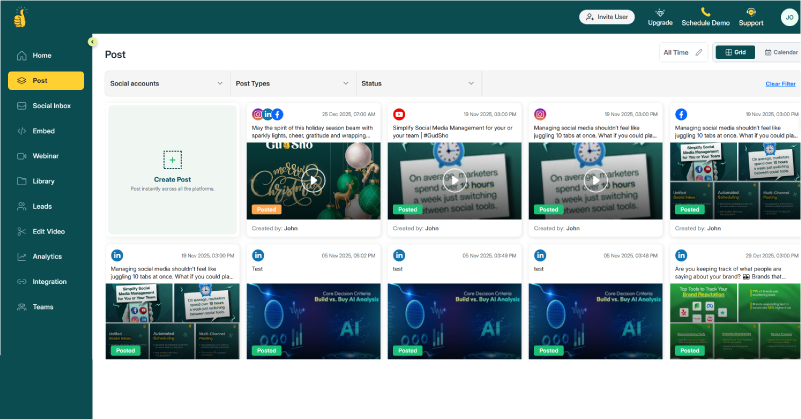
- Now select Social Accounts in which you want to schedule your posts. As we are speaking about Instagram here, select your Instagram account.
Note: This Instagram Automation tool allows you to manage multiple Instagram accounts, helping you schedule and post simultaneously across all accounts with a single click.
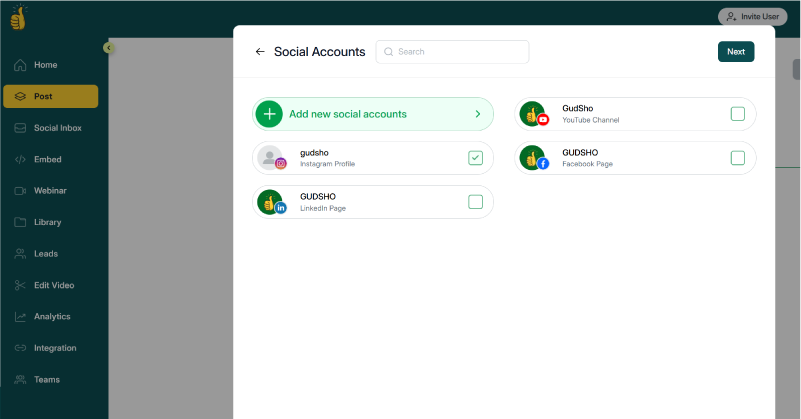
- Once you select Instagram, click Next.
- Now upload your post content like Images, Docs, Videos, Emojis, Texts, etc.
- GudSho Social also allows you to pull media assets directly from its library. You don’t need to visit your local drive every time you post; you can save your assets in the GudSho Social media Library to seamlessly manage your content for social media scheduling and posting.
- Once you upload your media file, click on Post Preview.
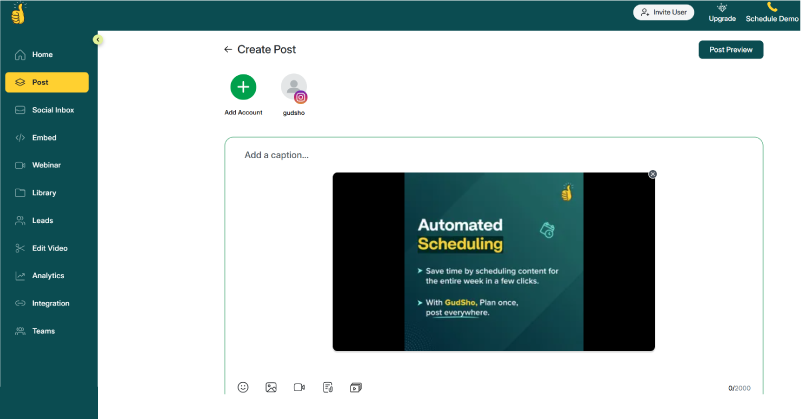
- Next, enable the toggle by selecting Post or Reel.
- Add a title, text and relevant captions or hashtags for your post.
- If you want to make any changes to your post, such as cropping, trimming, resizing or zooming, you can do so by clicking on the Edit option.
- Once you have finished editing, click on Schedule for Later.
- Now schedule your post for the desired date and time by selecting the specific time zone.
- Now, click on Schedule Post.
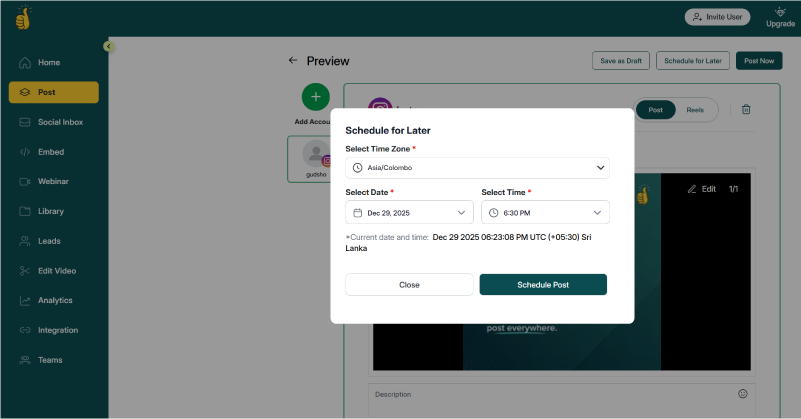
- Now the post will be auto-published at the selected time.
- Now your post will be published at the selected time. You can start engaging with your audience and tracking analytics to see how your content performed.
✨ Why GudSho Social Is the Best Tool to Schedule Instagram Posts
As a user-friendly social media management tool for agencies, marketers, businesses, and brands seeking seamless and effortless social media management, GudSho Social offers standout features and works as an Instagram automation tool.
✅ Unified social inbox
Since you can manage 5+ social media platforms and multiple accounts from each platform, GudSho Social provides a unified social inbox tool that allows you to manage all engagements, DMs and comments from one place, without switching between accounts. You can post content and respond to messages directly from a single dashboard, eliminating the need to visit Instagram every time you want to message or engage with your audience.
✅ Cross-platform content repurposing
The platform includes a built-in video editor, allowing you to create platform-specific social media content optimized for cross-platform publishing, without switching accounts or relying on external editing tools. You can upload a video or record one from scratch, then edit or repurpose it into social-media-ready content with ease.
✅ Auto-post Reels, Images, Carousels
GudSho Social supports universal video formats and allows you to add images, PDF carousels, text, emojis and videos. You can automate bulk publishing across multiple channels without juggling different apps, all from one unified dashboard.
✅ Bulk scheduling
You don’t need to post or schedule content one by one. You can select multiple media files and bulk schedule them in advance using the content calendar, allowing you to manage your social media workflow seamlessly.
✅ Team Approval Workflows
The platform offers seamless workflows that align your content and ensure stress-free content management for teams from start to finish. It enables seamless team collaboration through review stages, structured feedback and final sign-offs, so every Instagram post goes live with confidence knowing it’s been reviewed, approved and perfectly on point.
✅ Detailed performance analytics
Instagram offers analytics only for business accounts, but GudSho Social provides a 360° view of your Instagram post performance. It allows you to compare posts you’ve scheduled through a visual performance curve and navigate detailed graphs to see how well your content has performed over a selected timeline. This insight helps you analyze and optimize your content more effectively for better results.
✨ Best Practices for Scheduling Instagram Posts for Maximum Engagement
While you spend a lot of time planning and scheduling Instagram Reels and posts, it is equally important to follow some best practices for a smooth and effortless experience. Here is a list of best practices that need your attention, right before you auto-publish your Instagram post!
✅ Develop Quality Content
Your content is the king of Instagram engagement. Make sure to use trending hashtags, engaging captions, and impactful Stories to capture attention. Use high-quality HD images, 4K videos and persuasive content descriptions to ensure your posts stand out in crowded feeds. Make every post count, as your content shapes your social media presence and builds followers, views, loyalty and trust!
✅ Best Times to Post
This is the most important strategy you should always stick to. Your content may be worth a million dollars, but if it’s not shared at the best time to post on Instagram, you could miss the opportunity to reach and engage with the right audience. Instead of planning your calendar at random hours, follow the prime-time schedule. Boost visibility 10X, grow followers and spike engagement, all with this one strategy.
✅ Use Carousels & Reels
You should always stay in touch with growing trends, especially regarding Instagram algorithm updates. Learn which types of content are currently performing the best. According to Instagram Statistics 2026, Carousels and Reels are said to yield the highest engagement rates. Based on this data, you can plan and optimize your carousels and Reels based on your audience’s preferences, highlighting what truly matters in showcasing your brand.
✅ Maintain brand consistency
Be consistent with your posting schedule. Never skip days or timelines. Keep your Instagram content calendar packed with a clear strategy and posts rolled out ahead of time so your brand stays consistently in front of your audience. Become familiar with your audience and engage with them, connect, build community and create trust by personalizing your responses. This approach helps pave the way for business opportunities, leads and conversions.
✅ Avoid over posting
This is one of the best practices that you shouldn’t ignore. While consistency is essential, it does not mean bombarding your audience’s feed with random content or posting excessively. Over posting can overwhelm your audience and may lead to them blocking or unfollowing your account. To avoid this and maintain professionalism, follow a steady, consistent and well-planned posting schedule. Posting three times a day is generally not advisable. Instead, stick to a strategy of posting during prime times, on the best days and at the optimal times for your Instagram audience.
✅ Analyze your results
Can you schedule Instagram posts without tracking results? The answer is a big no. If you don’t know how your content is performing, what worked and what didn’t, you’ll never find room for improvement. Make use of Instagram Analytics or the unified analytics offered by social media management tools to monitor and measure performance metrics such as impressions, likes, shares, comments, play rate and more. This helps you analyze and optimize your content seamlessly.
Scheduling Instagram Posts Just Got Easier!
Instagram is one of the most popular social media platforms and needs to be handled carefully to achieve better engagement. To keep your workflow streamlined and organized, you should schedule your posts with a strategic plan or use creator tools for Instagram to schedule at least a month in advance using a content calendar.
We hope that the methods and pro tips discussed here help you schedule your Instagram posts effectively and ace your promotional strategy with ease. Whether you’re just getting started or already a pro at managing posts, this blog can guide you through easy social media marketing on Instagram!.
We wish you all the best with your scheduling ?!
Frequently Asked Questions (FAQs)
Can you schedule Instagram posts?
Yes, you can schedule Instagram posts using the Instagram app, Meta Business Suite or a social media management tool like GudSho Social.
Can I schedule stories?
Yes, you can schedule posts, reels and stories on Instagram.
Best times to schedule posts?
The best time to schedule posts differs across platforms, but the best time to post on Instagram is between 5 AM and 11 AM.
 Srinivasan is a Digital Marketer and Blogger with a passion for video marketing solutions and video hosting platforms. He is committed to sharing the latest tech trends, social media management tools ideas and enjoys discussing new technologies, along with helpful tips and tricks. An avid reader, He loves to share his insights with others.