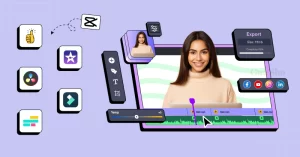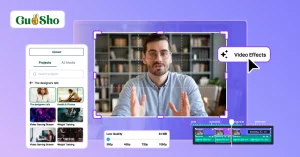

With AI editing of raw video footage, you are in control of the creative part of the edit, while the repetitive aspect is done for you. You review clips, select usable take(s) and cut dead air on the software, then direct the result and refine it.
This matters because raw footage piles up quickly. Two hours of recordings can be the starting point for a 20 minute video. Most of that time is spent watching, sorting, and trimming rather than making creative choices.
AI changes where those hours go. The tools in 2026 can do first-pass work that used to belong to an assistant editor. That frees you to focus on story, pace, and feel.
This guide covers where editing time actually disappears, how to prepare your footage, which tool type fits best, and how to build a fast workflow from upload to export.
Where does the time go when editing raw footage?
Production delays are not necessarily due to crafting. Craft is judgment. It covers the story, the rhythm, and what a cut should feel like.
Execution is the repetitive layer around it. Here is what it usually includes:
- Watching hours of footage to learn what you have
- Comparing several takes of the same line
- Cutting false starts, pauses, and filler words
- Arranging clips in a sensible order
- Fixing audio problems and matching color
None of these tasks is difficult. They are simply slow. Each one will also be repeated on each project, so the cost will escalate quickly.
It’s a good rule of thumb to remember that 20 percent of the job requires 80 percent of the time. The other 80 percent is a good candidate for automation. You decide what a scene should say. The software does the sorting.
How should you prepare raw footage before editing?
Good prep makes any editing method faster, with or without AI. A few small habits pay off every time.
Name your clips clearly. Rename files by scene, topic, or shooting order. Even a short label beats a string of camera numbers.
Keep one project folder. Store all clips, audio files, and references together. Searching across folders wastes minutes that add up.
Collect all the script or notes. With a script or transcript, be sure to have it on hand. It gives an editor a structure to build against. That’s OK if you don’t have one, as spoken dialouges can be read directly from the footage.
Mark your intent. Write a sentence or two about what the video should do. Who is it for? The viewer is instructed to remember what, which comes to guide each subsequent choice.
Keep the messy footage. Do not pre-delete things you think are bad. Let the editing process “taste” them. You might be shocked at what comes out of that usable.
Which editing tool is best for raw footage in 2026?
The right tool depeneds o the amount of grunt work you are willing to cede. Traditional editors give you excellent control. They still expect you to perform each step yourself.
AI editors work differently. You describe the outcome, and the software does the first pass. The best ones then leave everything on an editable timeline, so you stay in control.
The Invideo Editor follows this model. It is an AI video editor agent who is a professional video editor. It runs in the browser, so you sign up and start editing. You can try the free agentic video editor with no software to install.
You upload your footage and give the agent your direction. It reviews the material, picks the usable takes, and removes repeats and filler. It then lays the selected audio and video onto the timeline.
The important thing is for you to notice all the changes. The outcome is a time line that can be viewed, redirected and edited. There is no hidden behind an exported finish.
Invideo Editor also covers more than assembly. It features a video search, color and gradient, audio clean up, dubbing and versioning in the same project. That means you do not bounce between five different apps.
Who benefits most? YouTube creators that have long recordings are a no-brainer. So are editors cutting interviews, podcasts, multicam shoots, and commercial projects. Working in the same project is also beneficial for creative teams.
If you like the traditional editor, that’s a good option. Just weigh how much manual sorting it will ask of you.
How do you build a first cut from raw footage with AI?
The most valuable early step is a base cut. It is the first full time line you put together using usable footage – a base cut. The repeated takes, mistakes, pauses and fillers are now behind us.
No, it’s not a highlight reel. It is continuous and unbroken. It is also not a final deliverable. Its value is that you carry on editing from it.
Here is a simple workflow.
Step 1: Upload your footage. Add every clip to the media pool. Include the messy ones, since the agent needs them to find the best takes.
Step 2: Add a script or transcript. If you have one, attach it to each line the agent can the n match takes to each line.
Step 3: Describe the cut you want. You can ask by topic, story, shooting order, or transcript. For example: “Build a cut in shooting order, keep one clean take per point, remove pauses.”
Step 4: Go over the time line. Watch it once without stopping. Note anything that feels missing or out of order.
Step 5: Redirect and refine. Ask for changes in plain language, then adjust by hand where needed. Swap one take for another or tighten a section.
This works for different footage types. A single camera with a script gets one clean take per line. If the footage is not from a script, it will be counted one time per point. Multicam footage is synced and layered. Music-led projects can be arranged around a beat pattern.
Use messy footage for your first test. A few repeated lines and false starts show what the agent can clear away. You won’t see much when cleaning single takes.
Final thoughts
The trick to editing raw footage faster is to remove repetition: Prepare the videos, provide clear instructions, and let AI do the rest of the sorting. Then spend your energy where it counts, on story and rhythm.
The goal is not to remove the editor. It is to give an opportunity to editor to edit more.
Frequently asked questions
Can AI edit raw video footage automatically?
Yes, to a point. AI can review footage, select takes, remove filler, and assemble a first cut. You still guide the story and refine the result. Consider it as a quick assistant editor, but not a substitute.
How long does it take to edit a video with AI?
This can be reduced greatly in the assembly stage, particularly if it is the slowest stage, which is often. Refining and polishing still take time, but you start from a full timeline instead of a blank one.
What is the best way to cut filler and silence from video?
Use an editor that detects pauses, filler words, and repeated takes automatically. Doing it by hand means scrubbing through every minute. The AI editing agent in Invideo Editor does this in a single pass leaving the edits visible on the timeline.
Do I need a script to use an AI video editor?
No. A script helps the agent match takes to lines, but it is optional. The editor can work out what was said without the other, may take a single copy of each point and can drop the repeats.
What is a base cut in video editing?
A base cut is the first full shot of usable footage with mistakes, pauses and repeated shots removed. It runs start to finish and serves as your starting point for further editing.